 Bamas
BamasBamas Reports: Turn Your Business Data Into Clear Decisions
Your business generates valuable information every day. The challenge is turning that information into something useful. With Bamas Reports, you can review sales, revenue, payments, profit, stock activity, taxes, discounts and other important business records from dedicated reports.
What Is the Bamas Reports Module?
Bamas Reports is the reporting section of the Bamas – Smart Billing & Inventory System. It is designed to help business owners and teams review important information generated by their day-to-day operations.
Instead of looking at individual transactions and trying to calculate everything manually, reports provide a more structured way to examine what is happening in the business.
The Reports section includes operational reports covering products, stock, sales-related activity, taxes, discounts, customers, users and financial performance.
Good business decisions start with good information. Bamas Reports helps bring the information already generated by your business into clear, dedicated reports that are easier to review.
Profit & Loss at a Glance
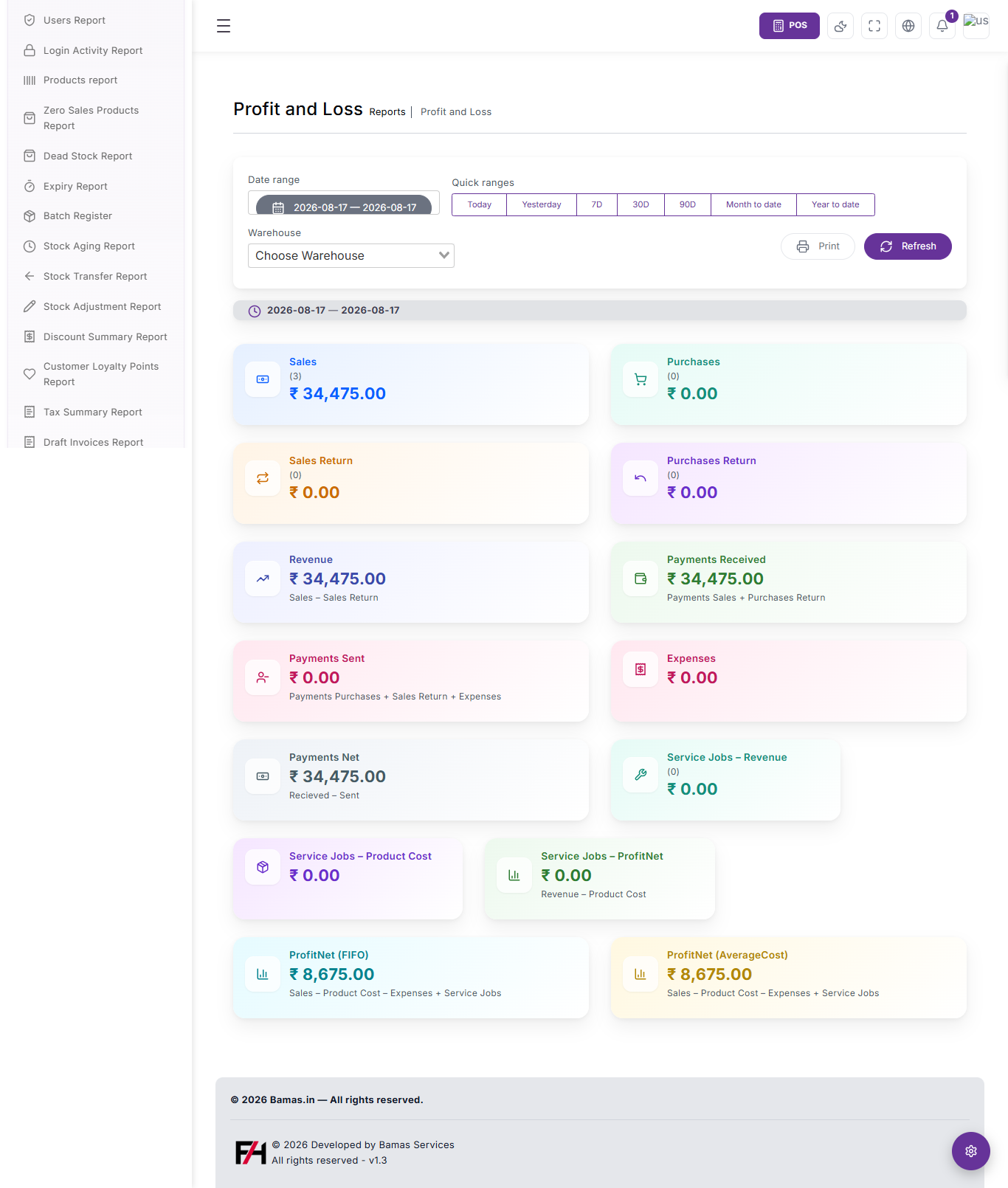
One of the key reports in Bamas is the Profit and Loss report. The screen provides a date-range selector, quick date ranges and a warehouse filter so the displayed figures can be reviewed according to the selected period and warehouse.
The report presents important figures in easy-to-read cards, making it possible to see the financial picture without having to manually combine multiple numbers.
Understand Your Sales and Revenue
Sales are one of the most important indicators for any retail business. Bamas Reports gives you a dedicated view of sales for the selected reporting period.
The Profit and Loss screen also displays Sales Return separately. This makes it easier to understand the difference between gross sales activity and the revenue remaining after sales returns.
In the displayed report, the revenue card identifies its calculation as:
Revenue = Sales − Sales Return
This gives the business a clearer view of revenue after accounting for sales returns within the selected reporting period.
Monitor Purchases and Purchase Returns
Bamas Reports also presents Purchases and Purchases Return as separate figures in the Profit and Loss report.
Keeping these values visible alongside sales information helps give the business a broader picture of the activity occurring during the selected period.
Purchases
Review the purchase value recorded for the selected date range.
Purchases Return
Review purchase returns separately from the main purchase figure.
See Payments Received and Payments Sent
Cash flow visibility is another important part of business reporting. The Bamas Profit and Loss report displays both Payments Received and Payments Sent.
The report also provides a Payments Net figure, shown as the difference between received and sent payments.
Track Business Expenses
Expenses can directly affect profitability. The Bamas Profit and Loss report includes a dedicated Expenses figure so business owners can review expenses alongside sales and product costs.
Keeping expenses visible within the same financial report makes it easier to understand how business costs affect the final profit figure.
Understand ProfitNet
Bamas provides two ProfitNet views in the displayed Profit and Loss report: ProfitNet (FIFO) and ProfitNet (AverageCost).
This gives businesses visibility into profitability using the two displayed product-cost approaches.
| Profitability View | Displayed Calculation |
|---|---|
| ProfitNet (FIFO) | Sales − Product Cost − Expenses + Service Jobs |
| ProfitNet (AverageCost) | Sales − Product Cost − Expenses + Service Jobs |
The Profit and Loss screen shown in Bamas provides both FIFO and Average Cost profitability views, allowing businesses to review the resulting ProfitNet figures using the available cost methods.
Service Jobs Revenue and Product Cost
Bamas Reports also includes dedicated figures for Service Jobs – Revenue and Service Jobs – Product Cost.
The report additionally displays Service Jobs – ProfitNet, with the displayed calculation based on revenue minus product cost.
Service Jobs – Revenue
Review revenue associated with service jobs for the selected reporting period.
Service Jobs – Product Cost
Review the product cost associated with service jobs.
Service Jobs – ProfitNet
Review the displayed service-job profitability figure based on revenue and product cost.
Choose the Date Range You Need
Business reports are only useful when you can examine the right period. The Bamas Profit and Loss report provides a date-range selector along with quick date-range options.
Filter Reports by Warehouse
Businesses operating with warehouse-based inventory can use the Warehouse selector shown in the Profit and Loss report.
This allows the report to be reviewed in the context of a selected warehouse rather than looking only at an overall business figure.
Multiple locations? Warehouse-based reporting can help you examine business activity according to the warehouse selected in the report.
Reports Available in the Bamas System
Bamas is not limited to one financial report. The Reports section provides several dedicated reports covering different parts of business operations.
Users Report
Review information associated with users in the system.
Login Activity Report
Review login activity recorded within the system.
Products Report
Review product-related information through a dedicated report.
Zero Sales Products Report
Identify products with zero sales through a dedicated report.
Dead Stock Report
Review dead-stock information to identify inventory that requires attention.
Expiry Report
Review expiry-related inventory information.
Batch Register
Access batch-related inventory records through a dedicated report.
Stock Aging Report
Review how inventory is aging through the stock-aging report.
Stock Transfer Report
Review stock transfer activity within the business.
Stock Adjustment Report
Review stock adjustment activity.
Discount Summary Report
Review discount information through a dedicated summary report.
Customer Loyalty Points Report
Review customer loyalty point information.
Tax Summary Report
Review tax-related information through a dedicated summary report.
Draft Invoices Report
Review invoices that remain in draft status.
Inventory Reports for Better Stock Decisions
Inventory management is not only about knowing how many products are available. Businesses also need to understand which products are selling, which products are sitting in stock and how inventory is changing.
Bamas provides dedicated inventory reports such as Zero Sales Products, Dead Stock, Expiry, Batch Register, Stock Aging, Stock Transfer and Stock Adjustment.
Identify Products That Need Attention
Not every product in a store performs the same way. Some products may sell regularly while others may remain in stock without sales.
The Zero Sales Products Report and Dead Stock Report provide dedicated ways to review these types of inventory situations.
This can help business owners focus their attention on products that may require a closer review.
Monitor Stock Aging and Expiry
Inventory that remains in a business for extended periods can require special attention. Bamas provides a dedicated Stock Aging Report for reviewing stock-aging information.
The Reports section also includes an Expiry Report for reviewing expiry-related inventory information.
Stock Aging
Review inventory according to stock-aging information.
Expiry
Review products and inventory information associated with expiry.
Review Stock Transfers and Adjustments
Inventory can move or change as part of normal business operations. Bamas includes separate reports for Stock Transfer and Stock Adjustment.
Having dedicated reports for these activities makes it easier to review changes in stock records and understand the movement of inventory within the system.
Keep an Eye on Discounts, Taxes and Loyalty Points
Retail reporting is not limited to sales and inventory. Discounts, taxes and customer loyalty activity can also be important parts of business management.
Bamas includes dedicated reports for Discount Summary, Tax Summary and Customer Loyalty Points.
Review Draft Invoices
Draft invoices can represent transactions that have been started but are not yet finalized. Bamas provides a dedicated Draft Invoices Report so businesses can review these records separately.
Reports for Business Owners and Teams
Reporting becomes increasingly important as more people use a business system. Bamas includes both a Users Report and a Login Activity Report, providing dedicated reporting areas for user-related information and login activity.
This gives businesses reporting options that extend beyond products and sales into system usage as well.
Print and Refresh Your Report
The Profit and Loss screen shown in Bamas includes dedicated Print and Refresh controls.
This keeps common report actions directly accessible while reviewing business information.
Why Business Reporting Matters
Running a business based only on intuition can become difficult as the number of products, customers, transactions and expenses grows.
Reports give business owners a structured way to look at what has already happened and identify areas that deserve attention.
Understand Sales
Review sales and revenue figures for the reporting period you select.
Monitor Profit
Review ProfitNet figures using the available FIFO and Average Cost views.
Watch Inventory
Use dedicated reports for dead stock, zero-sales products, stock aging and expiry.
Review Operations
Review transfers, adjustments, discounts, taxes, users and other business records.
How Bamas Reports Fits Into Your Business
The Reports module works as the information layer of the wider Bamas system. Products and inventory create the underlying records, sales and purchases generate transactions, and the Reports section helps you review the resulting business information.
Is Bamas Reports Right for Your Business?
If you want more visibility into your retail business without manually combining information from different records, the Bamas Reports module provides a centralized reporting environment.
From Profit & Loss and sales information to stock aging, dead stock, expiry, taxes, discounts and customer loyalty points, Bamas gives businesses dedicated reports for different areas of day-to-day operations.
Make Better Decisions With Better Business Reports
Bamas – Smart Billing & Inventory System
Get clearer visibility into your sales, inventory and business performance.
Plans starting at ₹199/month
15-Day Free Trial
Call / WhatsApp: 8309832108
Manage Your Business With Data. Grow With Confidence.
Frequently Asked Questions About Bamas Reports
What is the Bamas Reports Module?
Bamas Reports is the reporting section of the Bamas Smart Billing & Inventory System. It provides dedicated reports for sales, profit, inventory, taxes, discounts, customers, users and other business activities.
Does Bamas have a Profit and Loss report?
Yes. Bamas includes a Profit and Loss report with sales, purchases, returns, revenue, payments, expenses, service-job figures and ProfitNet information.
Can I select a date range for reports?
Yes. The Profit and Loss report provides a date-range selector and quick ranges including Today, Yesterday, 7D, 30D, 90D, Month to Date and Year to Date.
Can I filter the Profit and Loss report by warehouse?
Yes. The displayed Profit and Loss report includes a Warehouse selector.
Does Bamas have inventory reports?
Yes. The Reports section includes Zero Sales Products, Dead Stock, Expiry, Batch Register, Stock Aging, Stock Transfer and Stock Adjustment reports.
Does Bamas provide tax and discount reports?
Yes. Bamas includes dedicated Discount Summary and Tax Summary reports.
Can I see customer loyalty point information?
Yes. Bamas includes a Customer Loyalty Points Report.
Does Bamas have user activity reports?
The Reports section includes both a Users Report and a Login Activity Report.
Can I review draft invoices?
Yes. Bamas provides a dedicated Draft Invoices Report.
Does Bamas support FIFO and Average Cost profit reporting?
The displayed Profit and Loss report provides both ProfitNet (FIFO) and ProfitNet (AverageCost) figures.
How much does Bamas cost?
Bamas plans start at ₹199 per month, with a 15-day free trial available.
Bamas Reports – Clear business reporting for smarter retail management.
```