 Bamas
BamasBamas POS: Smart Point of Sale Software for Fast Billing & Inventory Management
Make everyday retail billing faster and easier with Bamas POS — a smart point of sale solution built to connect billing, products, customers, payments and inventory in one simple workflow.
What Is Bamas POS?
Bamas POS is the point of sale module of the Bamas – Smart Billing & Inventory System. It is designed to help retail businesses create bills, find products, manage customers, process payments and keep their sales workflow organized from the billing counter.
Instead of treating billing as a separate activity, Bamas connects the point of sale with your wider business operations. This means your billing counter becomes part of the same system you use to manage products, inventory, customers, purchases and business information.
One sale should not mean extra work. Bamas POS is designed to make the billing process simple while keeping your business records connected.
Fast Product Search and Barcode Billing
At a busy retail counter, manually searching for products can slow down checkout. Bamas POS provides a dedicated product search and scanning workflow so staff can quickly find the product they need.
Products can be located by searching by name or code, while barcode scanning can help speed up billing when products already have barcodes. This is particularly useful for retail stores with a large product catalogue.
Product Search
Quickly find products using product names or product codes instead of entering every item manually.
Barcode Scanning
Scan product barcodes to add items to the current bill faster at the retail counter.
Product Categories
Use categories to narrow down the product catalogue and make product selection easier.
Brand Filtering
Quickly filter products by brand when managing a large retail product catalogue.
A POS Screen Designed for Retail Billing
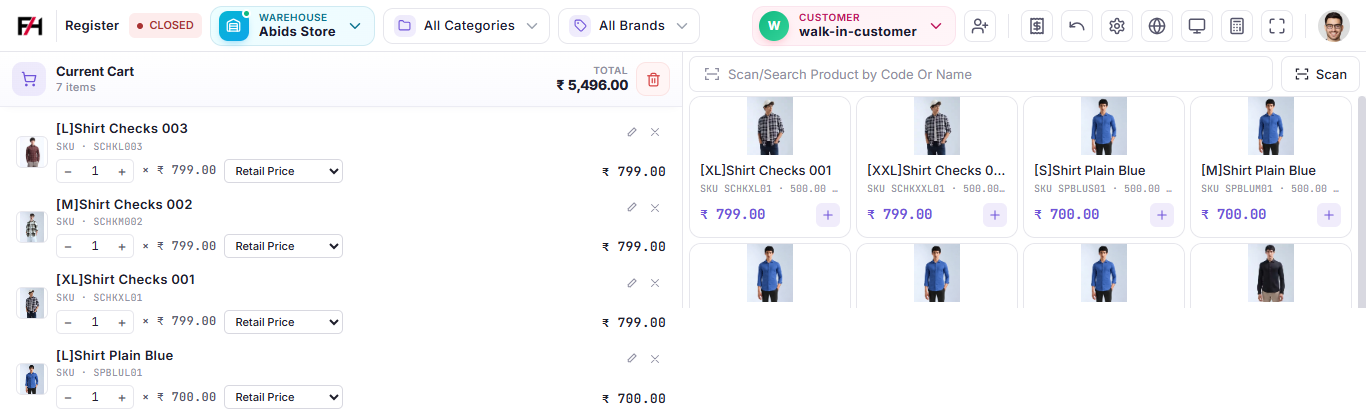
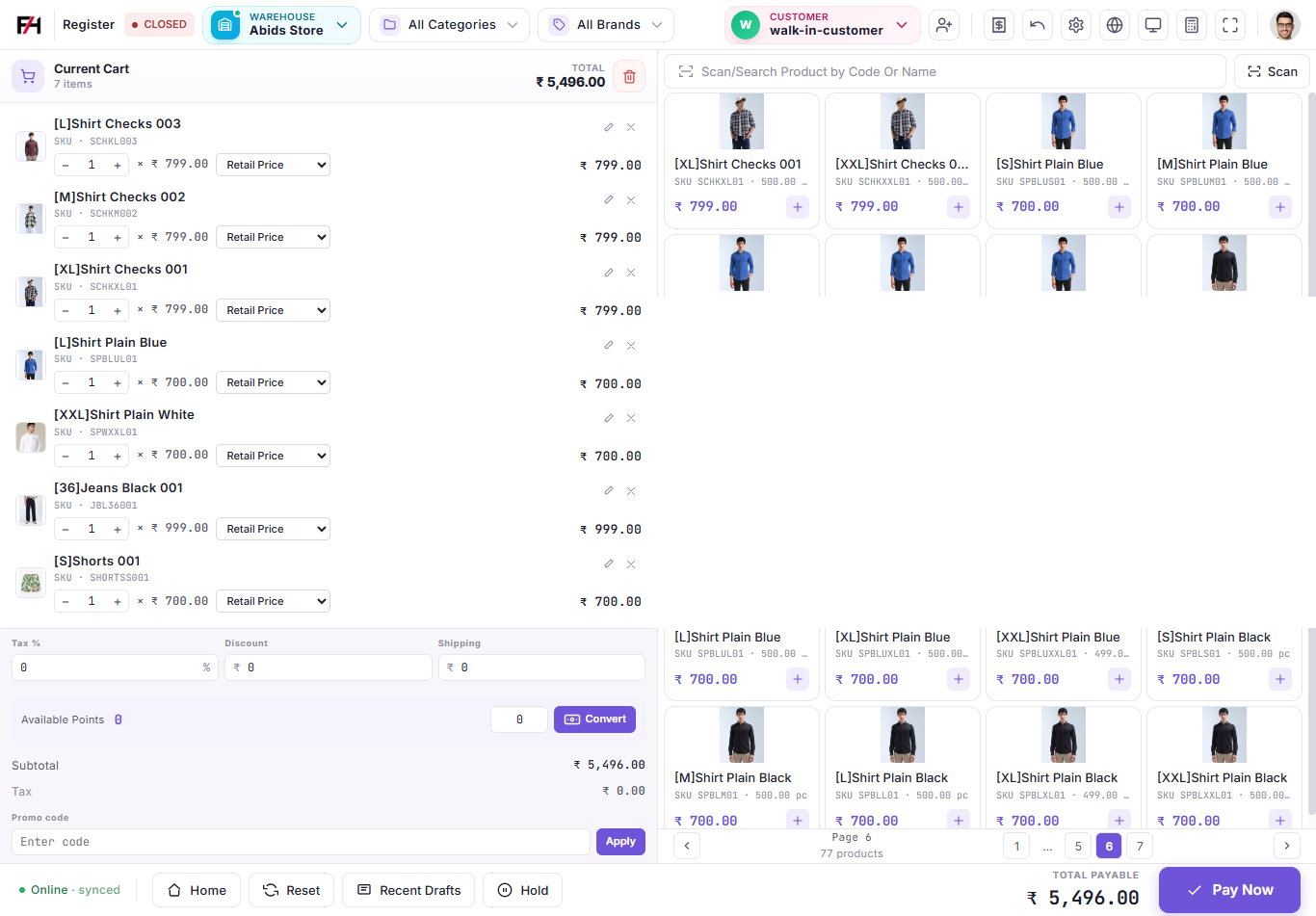
Bamas POS keeps the active cart visible while products remain accessible on the same screen. This allows the cashier to add products, adjust quantities and review the bill without repeatedly switching between different screens.
The cart displays the selected products, quantity, selling price and applicable price type. This gives the cashier a clear view of the current transaction before completing the sale.
Manage Customers Directly From the POS
Customer selection is available directly from the POS workflow, making it easier for staff to associate a sale with the correct customer.
This can be especially useful for businesses that maintain customer records and want their sales activity connected with their customer information.
Quick Customer Selection
Select the customer for the current transaction without leaving the billing workflow.
Walk-in Customers
Process everyday retail transactions quickly when a customer does not need a detailed customer record.
Customer-Based Sales
Keep customer information connected with sales activity for better business record keeping.
Repeat Billing
A connected customer and billing workflow can make repeat transactions easier to manage.
Multiple Payment Options at Checkout
Retail customers may use different payment methods depending on the transaction. Bamas POS is designed to keep payment handling inside the checkout process instead of making the cashier manage payments separately.
Once the products, quantities, discounts and other applicable charges are reviewed, the cashier can proceed to the payment stage and complete the transaction.
Simple checkout: select products, review the cart, apply the required adjustments, complete payment and finish the sale.
Taxes, Discounts, Shipping and Promo Codes
Retail bills can include more than the product selling price. Bamas POS provides dedicated fields within the checkout screen for common billing adjustments such as tax, discounts and shipping.
The POS screen also includes a promo code field, allowing businesses to apply promotional codes as part of the billing workflow when applicable.
Tax
Review and apply the applicable tax information while preparing the customer bill.
Discount
Apply a discount to the transaction when offering a customer a special price or promotion.
Shipping
Include shipping-related charges in the transaction when they apply to the sale.
Promo Codes
Enter promotional codes directly within the POS checkout workflow.
Manage Different Warehouses and Product Views
Growing businesses may operate more than one warehouse or location. The Bamas POS interface includes a warehouse selection area so the cashier can work with the appropriate store or warehouse context.
Product categories and brands can also be used to narrow down the products shown on the billing screen, making the interface easier to work with as the product catalogue grows.
Useful POS Tools for Busy Retail Counters
A good POS system should help staff handle more than just adding products to a cart. Bamas POS includes supporting tools designed around everyday retail operations.
Hold Orders
Keep an unfinished transaction aside when a customer needs additional time before completing the purchase.
Recent Drafts
Access saved or unfinished transactions from the POS workflow.
Point Conversion
Manage available customer points and convert them where the applicable loyalty workflow is enabled.
Quick Scan
Use the dedicated scan option when barcode-based product selection is the fastest way to build a bill.
Bamas POS for Garments and Retail Stores
Garments stores often manage many products across sizes, colours, styles and brands. As the number of products increases, fast product selection and accurate billing become increasingly important.
Bamas is designed with retail businesses in mind, including garments stores and other businesses that need connected billing and inventory management.
For a garments retailer, the workflow can be as simple as finding the required shirt, jeans or other item, adding it to the cart, confirming the quantity and price, selecting the customer where required and completing the payment.
For growing retail stores: Bamas connects POS billing with the wider Bamas billing and inventory system so your sales activity does not remain isolated at the counter.
From Billing to Inventory Management
The real value of a modern POS system is not only the receipt produced at the end of a sale. The transaction also becomes useful business information.
With Bamas, the POS forms part of a broader business management workflow that connects sales with inventory and other business operations.
Why Use Bamas POS?
Faster Billing
Search or scan products and build customer bills quickly from the dedicated POS screen.
Less Manual Entry
Product search, barcode scanning and customer selection reduce unnecessary manual data entry at the counter.
Connected Inventory
Keep POS activity connected with the wider Bamas inventory management workflow.
Built for Growing Businesses
Use Bamas as your business grows from a single retail counter towards more structured operations.
Is Bamas POS Right for Your Business?
If your business needs more than a basic cash register, Bamas POS can provide a more connected way to handle retail billing.
It is particularly relevant for businesses that want to combine POS billing, product management, inventory management, customers and business reporting instead of maintaining separate systems for each activity.
Ready to Make Your Billing Smarter?
Bamas – Smart Billing & Inventory System
Plans starting at ₹199/month
15-Day Free Trial
Call / WhatsApp: 8309832108
Fast Billing. Better Control. Smarter Business.
Frequently Asked Questions About Bamas POS
What is Bamas POS?
Bamas POS is the point of sale module of the Bamas Smart Billing & Inventory System. It helps retail businesses manage product selection, billing, customers, payments and sales from one checkout interface.
Can Bamas POS scan product barcodes?
Yes. The Bamas POS interface includes product search and barcode scanning functionality to help speed up product selection and retail billing.
Is Bamas POS suitable for garments stores?
Yes. Bamas is designed for retail businesses including garments stores and can help manage billing, products, inventory and sales operations.
Can I select customers while creating a bill?
Yes. Bamas POS includes customer selection within the billing workflow, along with support for walk-in customer transactions.
Does Bamas POS support discounts and promo codes?
The POS checkout includes fields for discounts and promo codes, allowing businesses to manage applicable promotional adjustments during billing.
Does Bamas POS work with inventory management?
Yes. POS is part of the wider Bamas Smart Billing & Inventory System, connecting sales activity with the broader inventory and business management workflow.
How much does Bamas cost?
Bamas plans start at ₹199 per month, and a 15-day free trial is available.
Bamas POS – Smart point of sale and billing software for Indian retail businesses.