 Bamas
BamasBamas Inventory: Smart Inventory Management Software for Retail Businesses
Take control of your products, stock quantities, prices and product information with Bamas Inventory — a practical inventory management module designed to keep your retail business organized and your stock information easy to manage.
What Is Bamas Inventory?
Bamas Inventory is the inventory and product management module inside the Bamas – Smart Billing & Inventory System. It gives businesses a centralized place to manage their products and keep important product information organized.
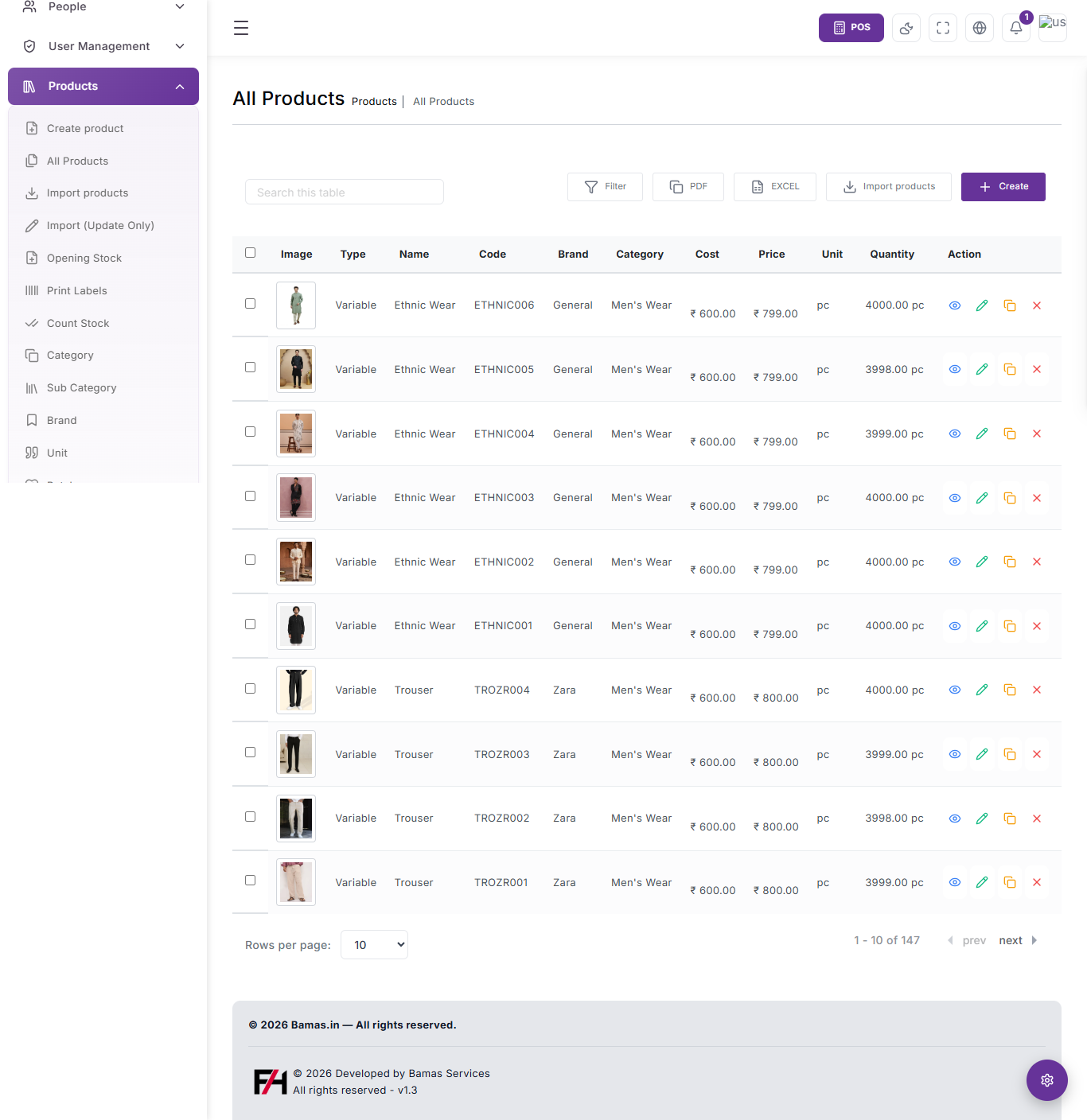
From the All Products screen, businesses can view product details such as product type, name, code, brand, category, cost, selling price, unit and available quantity.
Instead of keeping product information across spreadsheets, notebooks or disconnected records, Bamas brings these details into a structured inventory interface.
Your inventory is more than a list of products. It contains the information your business needs to know what you sell, how much it costs, what price you sell it for and how much stock is available.
Manage All Your Products From One Screen
The Bamas All Products screen provides a clear table-based view of your product catalogue. Each product row brings important information together so you can review your inventory without opening every product individually.
The product table includes fields for:
- Product Type — identify the type of product.
- Product Name — quickly identify the item.
- Product Code — use a unique code for product identification.
- Brand — organize products by brand.
- Category — group products into relevant categories.
- Cost — keep the product cost visible.
- Price — manage the selling price.
- Unit — identify the unit used for the product.
- Quantity — view the available product quantity.
Create New Products Easily
A good inventory system starts with accurate product information. Bamas provides a dedicated Create option from the Products section so businesses can add new products to their catalogue.
As your business introduces new garments, products, brands or other items, they can be added to the inventory instead of maintaining a separate product list outside the system.
Build a Structured Product Catalogue
Keep product information organized by maintaining product names, codes, brands, categories, prices, costs, units and quantities within the Bamas inventory system.
Import Products Instead of Adding Everything Manually
Businesses with an existing product catalogue may already have a large number of products to enter. Adding every product one by one can take unnecessary time.
Bamas Inventory includes an Import Products option, providing a dedicated workflow for bringing product information into the inventory system.
The Products section also includes an Import (Update Only) option, giving businesses a separate workflow for product updates.
Import Products
Bring product information into Bamas when setting up or expanding your product catalogue.
Import — Update Only
Use a dedicated update workflow when the purpose is to update existing product information.
Manage Opening Stock
When moving an existing business into a new inventory system, the starting stock position is important. Bamas includes an Opening Stock option in the Products section.
This gives businesses a dedicated place to work with their opening stock as they establish their inventory records inside Bamas.
Starting with existing stock? Opening Stock helps make the transition into your Bamas inventory records more structured.
Keep Stock Accurate With Count Stock
Physical stock and recorded stock can sometimes differ. Regular stock checking is therefore an important part of inventory management.
Bamas includes a Count Stock option in the Products section, giving businesses a dedicated inventory operation for stock counting.
For retail businesses, this can be useful when reviewing physical stock and maintaining more reliable inventory records.
Organize Products With Categories and Sub Categories
As a product catalogue grows, finding individual products becomes easier when products are organized logically.
Bamas Inventory includes dedicated options for Category and Sub Category, allowing businesses to structure their product catalogue into meaningful groups.
Categories
Group products into broader product categories to keep the inventory catalogue organized.
Sub Categories
Create a more detailed product structure when categories alone are not enough.
Manage Brands and Units
Retail businesses often sell products from different brands and may use different units for different types of products.
The Bamas Products section provides dedicated management options for Brand and Unit, helping businesses keep product information consistent across their inventory.
Brand Management
Organize products according to their brands and maintain a more structured product catalogue.
Unit Management
Maintain the units associated with products so quantities can be represented appropriately in your inventory.
Track Product Cost, Selling Price and Quantity
Knowing how much a product costs, how much it sells for and how much stock remains is essential for day-to-day retail management.
The Bamas All Products table places these values directly in the product listing, allowing you to review important inventory information at a glance.
Search and Filter Your Product Catalogue
Large product catalogues can become difficult to manage when every product is displayed at once. Bamas provides a Search this table field and a dedicated Filter option on the All Products screen.
These tools make it easier to narrow down the information you need instead of manually scanning through every product row.
Export Inventory Information to PDF or Excel
Businesses sometimes need inventory information outside the main application for record keeping, analysis or sharing.
The Bamas All Products screen includes dedicated PDF and Excel options, providing convenient ways to work with the product information displayed in the inventory module.
Export product information into PDF format when a document-based copy is required.
Excel
Export product information into Excel format for further spreadsheet-based work.
Print Product Labels
Product identification is particularly important in retail businesses. The Bamas Products section includes a dedicated Print Labels option.
This provides a dedicated workflow for businesses that need to work with product labels as part of their inventory and retail operations.
Manage Products From One Central Inventory Module
Instead of treating every inventory task as a separate system, Bamas brings several important product operations together inside the Products section.
Bamas Inventory for Garments and Retail Stores
Garments stores can have a large number of products across different categories, brands, styles and product codes. Keeping those products organized becomes increasingly important as the business grows.
Bamas provides the core product-management tools needed to maintain a structured retail catalogue, including product codes, brands, categories, sub categories, prices, costs, units and quantities.
For a garments store, this means the inventory team can work from a centralized product catalogue rather than depending entirely on manually maintained lists.
For growing retail stores: Bamas helps turn your product catalogue into an organized inventory system that can support your everyday billing and stock operations.
Why Use Bamas Inventory Management Software?
Centralized Product Management
Keep product information, prices, quantities, categories, brands and units together in one inventory module.
Better Stock Visibility
Review product quantities directly from the All Products screen instead of relying only on separate manual records.
Easier Product Organization
Use categories, sub categories, brands and units to create a structured product catalogue.
Faster Inventory Operations
Access importing, opening stock, stock counting, labels and product management from the same Products section.
How Bamas Inventory Fits Into Your Business
Inventory does not operate independently from sales. Your product catalogue provides the foundation for the billing process, while stock information helps you understand what is available in the business.
With Bamas, inventory management is part of the wider Smart Billing & Inventory System, giving businesses a connected platform for managing their products and retail operations.
Is Bamas Inventory Right for Your Business?
If your business manages multiple products and needs a structured way to organize product information and stock, Bamas Inventory can provide a centralized solution.
It is especially useful for retail businesses that want their products, stock quantities, prices, categories, brands and billing operations to work together rather than being maintained across disconnected systems.
Ready to Manage Your Inventory Smarter?
Bamas – Smart Billing & Inventory System
Plans starting at ₹199/month
15-Day Free Trial
Call / WhatsApp: 8309832108
Manage Stock. Organize Products. Grow Smarter.
Frequently Asked Questions About Bamas Inventory
What is Bamas Inventory?
Bamas Inventory is the product and inventory management module within the Bamas Smart Billing & Inventory System. It provides tools for managing products, categories, brands, units, prices and stock quantities.
Can I create products in Bamas Inventory?
Yes. The Products section includes a dedicated Create option for adding products to your inventory catalogue.
Can I import products into Bamas?
Yes. Bamas Inventory includes an Import Products option as well as a separate Import (Update Only) workflow.
Does Bamas support opening stock?
Yes. The Products section includes an Opening Stock option for managing opening inventory as part of the inventory setup.
Can I count stock in Bamas?
Yes. Bamas includes a Count Stock option within the Products section for stock-counting operations.
Can I manage categories and brands?
Yes. Bamas provides dedicated management options for Category, Sub Category and Brand within the Products section.
Can I export product information?
The All Products screen provides PDF and Excel options for working with product information outside the main inventory screen.
Is Bamas Inventory suitable for garments stores?
Yes. Bamas is designed for retail businesses, including garments stores that need to organize products, categories, brands, prices, units and stock quantities.
How much does Bamas cost?
Bamas plans start at ₹199 per month, with a 15-day free trial available.
Bamas Inventory – Smart product and stock management for Indian retail businesses.
```